01Changelog
Oldest first · follow the line
changelog.
From the first commit to the latest release, one stop at a time.
5,400+ commits · latest v0.1.5
02The road to 0.1.0
nine stops · one row a stage
one idea,
one file format.
Before any canvas, Recto had to prove one thing: that an edit can change only the bytes it means to. Everything after was built on that.
First commit
The first line of Recto.
Every edit, a minimal diff
An edit changes only the bytes it means to.
Select and inspect
Click anything on the canvas and read its styles.
A new app shell
The editor you use today: sidebar, canvas and panels.
Design systems
A DESIGN.md and theme.css tokens in every project.
3D and Motion
Parametric scenes, and timelines with keyframes.
Vector editing
Pen, pencil and shapes, with booleans and gradients.
Several windows
Several windows, one project in each.
-
v0.1.0
The first public release
everything is new.
24 changes across 8 parts of the app, on macOS, Windows and Linux.
See what shipped ↓
03What 0.1.0 shipped
24 changes · 8 parts of the app
what 0.1.0 shipped.
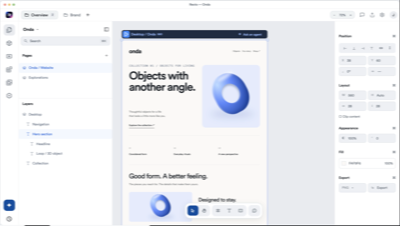
The first public release of Recto: design on a real canvas, keep every design as HTML and CSS, and work with the coding agents already on your computer.
Canvas
- Your design is an HTML file. Recto watches it and redraws the moment it changes.
- Select, move and resize, with auto layout that writes real flex and grid.
- Double-click any text to rewrite it in place.
- Frames at the widths you choose, with media queries evaluated per frame.
Agents
- Works with Claude Code, Codex, Cursor and OpenCode on your computer.
- Start an agent from a brief on Home, with images attached.
- Pin comments to any element; your agent reads them and replies.
- Follow keeps the camera on whatever your agent is building.
Design systems
- Every project gets a DESIGN.md and its tokens in theme.css.
- Six included systems: Ledger, Grid, Loom, Kiln, Signal and Riot.
- Capture a design system from any website.
- Components with variants and linked instances.
Import
- Import a page from a URL, rebuilt as editable HTML.
- Paste from Figma straight onto the canvas.
Motion
- Timeline compositions with keyframes, video, images, audio and 3D clips.
- Export to video inside the app.
3D
- Parametric scenes with Blender-style navigation.
- Export a scene as .glb.
Vector
- Pen, pencil and shapes, booleans, gradients, effects and masks.
- Export SVG, or PNG at 1×, 2× or 3×.
The app
- Several windows, one project in each.
- Docs and diagrams beside your pages.
- Help → Keyboard Shortcuts lists every key.
- Report an issue or request a feature from the Help menu.
04Since 0.1.0
free updates · latest v0.1.5
since 0.1.0.
Every update since the first release is free, and Recto installs it by itself when you quit. These are the biggest additions so far.
Browser
- A browser beside your canvas, in a panel or a window of its own.
- Pick any part of a website and copy it to your canvas as editable HTML, with its pictures, fonts, motion and hover states.
- Your agent can browse with you: read pages, take screenshots and copy parts. It asks you first before anything that buys, sends or deletes.
Motion
- Smoother playback: Recto prepares your timeline in the background and plays what it prepared.
- Sound starts with the picture.
- Skip a scene or mute a nested clip, and rename, arrange, skip or mute from the Animations list.
- The ruler stays in view while the rows scroll.
Zen mode and ⌘K
- Zen mode (⇧⌘\) puts only your design and your agent on screen. Zen mode, design only, hides the agent too.
- ⌘K opens any page, frame, layer, tab or command from anywhere.
The app
- Tabs: a row for each space, each tab with its own Back and Forward. Open a file twice and Recto takes you to its tab.
- Tabs switch at once.
- An Assets library: bring many files in at once. Rename or move one and every page that uses it follows, in one undo.
- A What's new tab after each update.
Found something broken? Open Help → Report an Issue inside Recto.